Screen work.
But much more relaxed.
Forget glaring screens and rigid blue light filters. Ambient Flow seamlessly adapts to your day – for rested eyes, less glare, and a noticeably more comfortable working experience on Windows 11.
Because your day isn't static.
Conventional blue light filters only know two states: on or off. Ambient Flow seamlessly intercepts cold, harsh contrasts in the morning and overly bright light in the evening. It was designed to bridge the gap between rigid software and a dynamic workday by letting you adjust the color temperature exactly to your visual preferences. It’s not just a simple filter. It’s the tool that makes your screen feel naturally better.
End the Whitescreen Shock.
Your code editor runs in dark mode, but the documentation, Excel sheet, or client PDF glares at you at full brightness? This is exactly where Ambient Flow shines. While conventional filters are barely noticeable on dark designs, our software seamlessly intercepts the aggressive contrast of bright backgrounds. For a smooth transition that makes reading on the screen noticeably more comfortable.
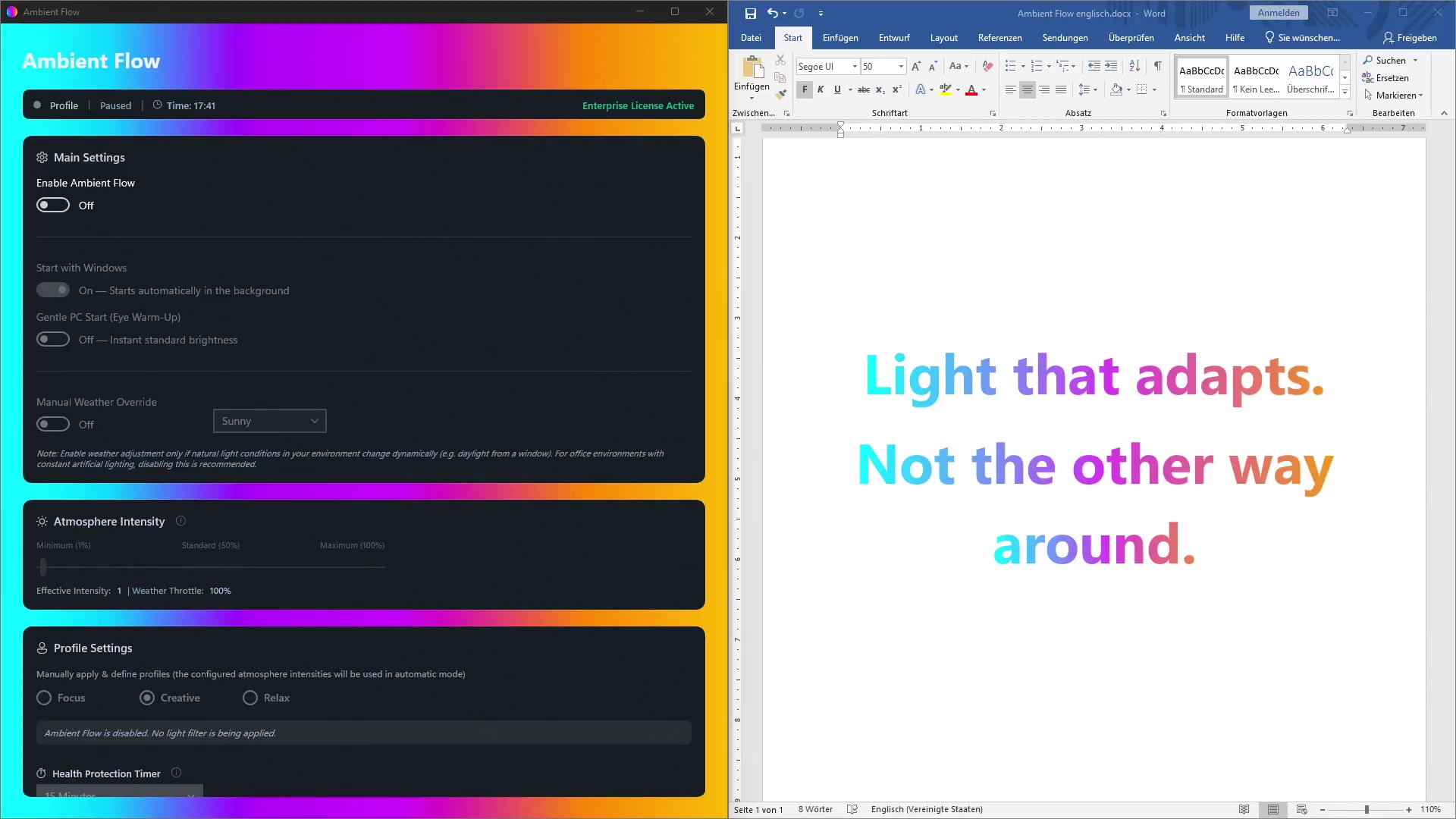
A new era of visual ergonomics – Designed for your workday
Rigid, glaring screens can make working at a PC uncomfortable and exhausting over time. Sitting for hours without dynamic adjustments or with an uncontrolled static filter quickly leads to a loss of visual comfort. The result: concentration drops and the screen light feels disruptive.
Ambient Flow was developed to give you back control over your workspace. The core of the application lies in its smart color profile filters, specifically tuned to different workflows and lighting needs:
Focus (Targeted Activation)
Clear, crisp light when you need to be wide awake. Contrasts are sharp, the image is crystal clear. Perfect for mastering complex tasks with full concentration.
Creative (Endurance & Balance)
A balanced, warm light that feels like a white book page. It removes the harshness from the screen so you can stay in the flow for hours without interruption.
Relax (Downtime & Balance)
A gentle, dimmed light that takes the edge off the screen. Perfect for a visual break in the middle of the day – like a quick power nap for your eyes. And when the workday ends, it provides a warm, calming display so you can wind down relaxed.
What makes it special is the interplay of individual autonomy and intelligent comfort: You are the architect of your light, flexibly adjusting the visual intensity to your feelings and workflows. The integrated ergonomic timer acts as a safety net: It ensures you don't unknowingly stay stuck in one setting, protecting you from a rigid visual impression that is often perceived as disruptive with conventional filters and static system settings.
Onyx-Core: Subtle adjustments from 1%
The pleasant effect of Ambient Flow begins at just 1%. Even if you barely notice it at first glance, the filter subtly removes the harshness from the light, keeping the visual impression comfortable and natural for most everyday tasks.
Note: Since any mathematical color matrix filtering physically shifts the color spectrum on the monitor, the integrated recommendation is to temporarily revert the filter to the standard system setting for professional, purely graphical work requiring absolute color accuracy.
Full control over your visual ecosystem
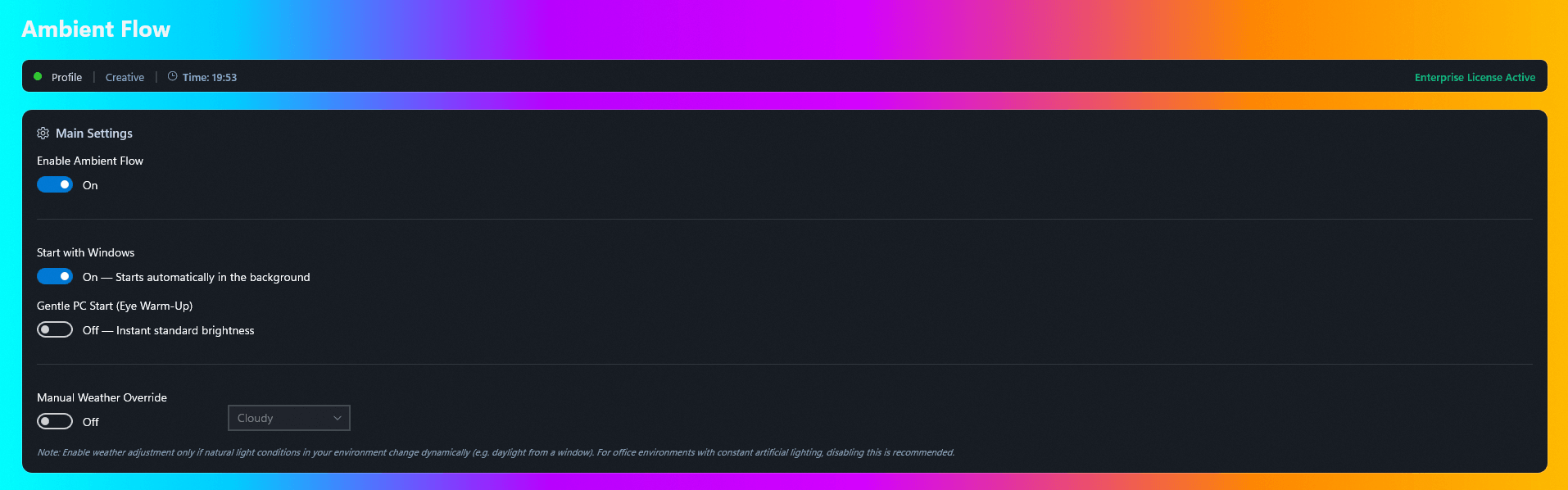
Soft PC Start & Manual Weather Adjustment
Experience maximum comfort from the very first second: The soft PC start gradually accustoms your eyes to the screen brightness in the morning. With the manual weather adjustment, the app also lets you flexibly dim the pure monitor brightness with a single click when ambient lighting conditions change dynamically – for example, due to natural daylight at the window on a gray, rainy day.


Seamless adjustment without compromises
Using the seamless intensity slider, you calibrate the filter strength exactly to your personal perception. Use the flexible manual override for targeted sessions – thanks to the integrated ergonomic timer, no profile runs uncontrolled, ensuring you automatically return to the filterless system setting via a smooth, up to 2-minute transition after the selected time expires.
Your Day. Your Rhythm. Your Schedule.
The 24-hour timeline gives you absolute freedom. Configure your phase times for Focus, Creative, and Relax exactly as it fits your real workday.
- Eye Powernap: Use the Relax profile for conscious, restful breaks in between.
- Smart Transition: Outside your scheduled times, your standard system setting is automatically displayed.
Once set, Ambient Flow seamlessly flows in the background with your day.
Data Security & Performance
100% Local & GDPR Compliant
No tracking, no telemetry. The app works completely offline. The only strictly anonymized network connection is made solely to verify the license key (hardware hash).
Resource-efficient (C# / .NET)
Minimal RAM usage and near-zero CPU load. The application is deeply optimized for Windows 11 and runs in the background without affecting your system performance.
Reliable Storage
Your favorite settings are always safely stored and immediately available on the next PC start. No delays, no bugs. You always have exactly your desired setup.